
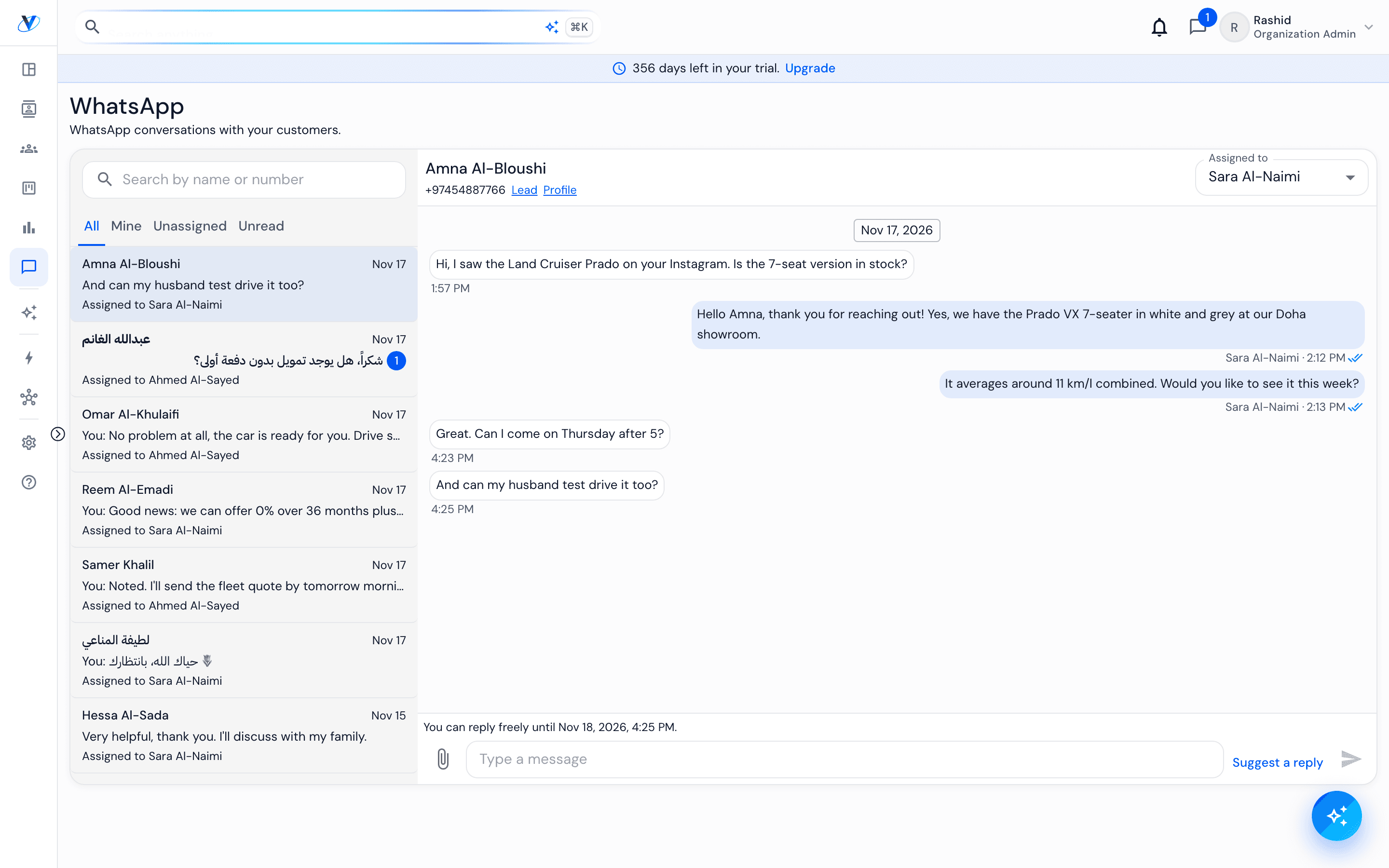
WhatsApp brings each customer's conversation into Vorniqe, assigned to a sales executive and linked to the lead, the Contact and the enquiry. It is WhatsApp in the sidebar, and its own tab on Vorniqe Mobile.
How it works
- 01
Find a conversation
Filter by All, Mine, Unassigned or Unread, or search by name or number. The thread links straight to the lead, the profile and the enquiry.
- 02
Reply inside the window
For 24 hours after the customer's last message you can reply freely; the thread shows when the window closes. Your reply leaves from the number the customer wrote to.
- 03
Use Suggest a reply
Where it is switched on for your dealership, Suggest a reply puts a drafted answer in the message box, in the customer's language. Read it, change it if you want, and press Send. It never sends by itself, and it leaves out any price, discount, stock or finance decision the conversation did not state.
- 04
After the window closes
Send an approved template. Templates and attachments are sent from the desk; on the phone, the WhatsApp tab answers inside the window and says when a template is needed.
- 05
Hand a conversation over
Change Assigned to and the thread moves to another sales executive. When a customer writes on a thread you own, your phone gets a notification.
Worth knowing
A sales executive sees the conversations assigned to them.
Messages are part of the Contact's history and stay there when a conversation changes hands.